Showing posts with label mac os x. Show all posts

Wednesday, March 28, 2012

iPad Mini would be just like using an iPhone

There's been recently lot of rumors about the possibility of "iPad Mini", i.e. an iPad with smaller than 9.7 inch screen that the normal iPad has. Apple has for quite some time resisted the need for different screen sizes on the iPhone – it has stuck with the original 3.5 inch screen, while others have gone wild with larger screens. And to its credit, iPhone is definitely more pocketable than the larger mobiles.

 The 9.7 inch iPad definitely is awesome for the immersive experience it is able to provide with so much screen estate, especially now that it has retina resolution (264dpi, viewed from 40cm distance). However, the e-reader market has been able to make a strong case (at least for some particular uses) for smaller-than-10-inch screens, with sizes closer to pocket book.

But that would require UI redesign?

One of the biggest practical reasons against doing another screen size for iPad is that it could very likely lead to UI redesign, as the physical size of the touch areas would be different. Both for Apple's apps and 3rd parties. However, Apple has been pretty genius with its math around screen sizes and pixels and resolutions. Essentially iPad Mini could use the same pixel size (1024x768) and UI as original iPad and still reduce the screen size to 7.85 inches (163dpi), while still being as easy to use as an original iPhone (also 163dpi).

How is that possible? Well that starts with the Apple Human Interface Guidelines, which state any interactive area must be at least 44px by 44px in size. Additionally, you can sometimes tweak this a bit by providing much wider interactive area, while reducing the height slightly.
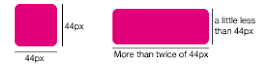
 
Every iPhone and iPad follow this same rule (retina displays just double the pixels). So on iPhone the smallest button has physical size of 6.86 millimeters, while on the iPad the smallest button is 8.47 millimeters. As you can see, the iPad buttons are physically significantly bigger. But due to longer viewing distance (40cm versus 28cm on iPhone), they don't appear to be so large as they physically are, when compared to iPhone.

So a smaller iPad Mini (at 163dpi) could use the smallest physical button size of 6.86 millimeters, while still following the Apple HIG, and more importantly, being able to use the iPad UI and apps just as-is.

Ok, so how would that feel like then?


Well, it's pretty hard to get a feel of a new device, without having a real prototype. But you can try looking and trying the full size version of the picture below inside normal iPad. It is scaled to be physically correct size, when viewed on full screen in iPad.

As a comparison, here's the screen of the original iPhone with the same button measurements.


Once you go retina, you won't go back

After putting so much effort in showcasing how amazing the retina displays are, would Apple really launch iPad mini with a non-retina screen? While the R&D is ongoing, it's fine to use prototypes with 163dpi. When it comes to commercial releases, however, Apple is in no big hurry or pressure to et iPad Mini out of the door prematurely. So, maybe when it is possible to do 330dpi retina displays at 7.85 inches, the iPad Mini might become reality. As of March 2012 such displays are not available on the mass market. That kind of 7.85 inch retina display would have the same resolution as iPhone 4S and same amount of pixels as the new iPad, i.e. 2048x1536 at 330dpi.

The crazy math

Should Apple ever do iPad Mini with the above measurements, the logical next step would be to do larger iPhone as well, with the iPad size physical screen buttons. This would translate to roughly 4,32 inch screen, but unfortunately the resolution would be "only" around 267dpi, which is below the retina threshold. Additionally, for a phone, the pocket-ability would suffer as well. So no magical solutions there.

Monday, October 23, 2006

Insight from the past

While it's often exciting to wait for new products from Apple and other design companies, it's not actually necessary to just speculate, collect rumours and get insider tips about the products.

Much of the important "big lines" (strategies) and many features of the products can be understood through insight by researching and understanding the moves of the past. One of the sources for this type of insight is RoughlyDrafted.

Note that there is, of course, a price tag on such insight - namely lot's of fluffy text, advertising and many requests from the author to promote the website. so YMMV.

After reading many of the texts, it makes one respect and appreciate Apple (those times that it's been successful) for the hard work of 1) finding a right product for the current time/age, 2) timing the launch of products, 3) iterative design, and 4) taking advantage of the concepting/previous attempts for products.

RD notes:
Apple
Important areas: Office (MS, ignorance of MacWrite) -> Desktop Publishing (Adobe & PS & PDF) -> Digital Media (Quicktime)

Historically Apple dependent on four major application vendors: Microsoft, Adobe, Macromedia, and Quark (all originally started their graphic apps on Mac)

Past projects:
- Powertalk (no standards, based on AppleTalk) -> similarities to Mac OS X: Bonjour, systemwide Keychain & Addressbook
- QuickDraw GX,
- A/UX -> idea recycled in Mac OS X (UNIX basis, but based on BSD)
- HyperCard -> Human-oriented programming languages: Applescript, Automator
- Copland (another) -> "System 8"
- Pink -> entirely new development platform for the Mac with IBM, code named Pink and Taligent
- Newton
- QuickDraw 3D
- Quicktime Interactive
- Common Point
- OpenDoc
- Dylan - futuristic coding language
- Future Shock

...
The new surge of Apple-made software:
- Macromedia KeyGrip -> Apple Final Cut
- Astarte's DVD technology -> Apple DVD Studio Pro
- Nothing Real's high end video compositing -> Apple Shake
- Emagic's professional level music studio tools -> Apple Logic Pro
- Apple Aperture
- & bundled non-pro versions of the apps: iLife (iMovie, iTunes, iDVD, iPhoto, Garageband, iWeb), iWork (Pages, Keynote)
- & non-bundled "pre-pro" (prosumer) versions: Final Cut Express, Logic Express

Mac OS X
- pre-emptive, multitasking (UNIX foundations), shell + UNIX toolchain
- object oriented programming: Cocoa (from NEXTStep)
- Bonjour
- systemwide Keychain & systemwide Address Book,
- iWork (key areas: Office + Desktop Publishing)
- iLife + pro apps -- taking advatage of quicktime (Key area: Digital Media (Content creation))
- Applescript (& Automator)
- Quartz 2D: entirely new drawing system: based on the open PDF model, with a standard implementation of the OpenGL specification. Replaced the archaic and proprietary QuickDraw and QuickDraw 3D.

iTV
- On Demand Commercial Content
- Personal Content
- Alternative Content
- Interactive Content (dynamic, not static media) -- The iPod way: Games, Widgets, Notes (+ VNC)
- Original Content (Apple as a Label and a Studio, Original Content for TV - not for Movies)

Apple's way up
- Good integration of software, hardware and services (holistic design)
- High quality software/hardware (distinctive, not bulk)
- Concentration on specific markets/key areas (office work, desktop publishing, digital media/creatives)
- Apple-created key applications
- Three levels of products, with high reuse in code: non-pro (consumer), pre-pro (prosumer), and professional
- Packaging the right mixture, pricing it right
- Better visibility - Marketing (e.g. I am a PC, I am a Mac -ads) and Retail stores (+ digital store)

Tuesday, September 05, 2006

Hacker for life

After reading the excellent book "Hacker Ethics" by Pekka Himanen, I feel like one of the ways to describe what I really want to do is to "be a Hacker in more areas than just computers/open source". The hacker in there refers directly to the Himanen's description of it, something like: "working passionately on something that one is interested about, and having fun while doing it. Sharing the results with the rest of the world".

Even with the definition of the word hacker, my description is still vague. But it's nonetheless, the starting point I'm going with. And to start with a tradional way, I'm hacking with OpenOffice for Mac OS X :) It is, after all, the area where I began with my university studies.

What this means in other parts of my work life? Well, you'll have to wait and see.