There's been recently
lot of
rumors about the possibility of "iPad Mini", i.e. an iPad with smaller than 9.7 inch screen that the normal iPad has. Apple has for quite some time resisted the need for different screen sizes on the iPhone – it has stuck with the original 3.5 inch screen, while others have gone wild with larger screens. And to its credit, iPhone is definitely more pocketable than the larger mobiles.
The 9.7 inch iPad definitely is awesome for the immersive experience it is able to provide with so much screen estate, especially now that it has
retina resolution (264dpi, viewed from 40cm distance). However, the e-reader market has been able to
make a strong case (at least for some particular uses) for smaller-than-10-inch screens, with sizes closer to pocket book.
But that would require UI redesign?
One of the biggest practical reasons against doing another screen size for iPad is that it could very likely
lead to UI redesign, as the physical size of the touch areas would be different. Both for Apple's apps and 3rd parties. However, Apple has been pretty genius with its math around screen sizes and pixels and resolutions. Essentially iPad Mini could use the same pixel size (1024x768) and UI as original iPad and still reduce the screen size to 7.85 inches (163dpi),
while still being as easy to use as an original iPhone (also 163dpi).
How is that possible? Well that starts with the
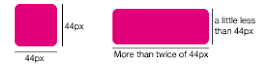
Apple Human Interface Guidelines, which state any interactive area must be at least 44px by 44px in size. Additionally, you can sometimes tweak this a bit by providing much wider interactive area, while reducing the height slightly.
Every iPhone and iPad follow this same rule (retina displays just double the pixels). So on iPhone the smallest button has physical size of 6.86 millimeters, while on the iPad the smallest button is 8.47 millimeters. As you can see, the iPad buttons are physically significantly bigger. But due to longer viewing distance (40cm versus 28cm on iPhone), they don't
appear to be so large as they physically are, when compared to iPhone.
So a smaller iPad Mini (at 163dpi) could use the smallest physical button size of 6.86 millimeters, while still following the Apple HIG, and more importantly, being able to use the iPad UI and apps just as-is.
Ok, so how would that feel like then?
Well, it's pretty hard to get a feel of a new device, without having a real prototype. But you can try looking and trying the full size version of the picture below inside normal iPad. It is scaled to be physically correct size, when viewed on full screen in iPad.
As a comparison, here's the screen of the original iPhone with the same button measurements.
Once you go retina, you won't go back
After putting so much effort in showcasing how
amazing the retina displays are, would Apple really launch iPad mini with a
non-retina screen? While the R&D is ongoing, it's fine to use prototypes with 163dpi. When it comes to commercial releases, however, Apple is in no big hurry or pressure to et iPad Mini out of the door prematurely. So, maybe when it is possible to do 330dpi retina displays at 7.85 inches, the iPad Mini might become reality. As of March 2012 such displays are not available on the mass market. That kind of 7.85 inch retina display would have the same resolution as iPhone 4S and same amount of pixels as the new iPad, i.e. 2048x1536 at 330dpi.
The crazy math
Should Apple ever do iPad Mini with the above measurements, the logical next step would be to do larger iPhone as well, with the iPad size physical screen buttons. This would translate to roughly 4,32 inch screen, but unfortunately the resolution would be "only" around 267dpi, which is below the
retina threshold. Additionally, for a phone, the pocket-ability would suffer as well. So no magical solutions there.